


Onoff Numbers
3.6277.00 Reviews
App Specs
- Version
- 5.9.7.0
- Updated On
- License
- Free
- Downloads
- 1,000,000+
- Developer
- Onoff Telecom
- Categories
- Communication
- Platform
- Android, iOS
Screenshots
 Analysis by AppCompare
I look at Onoff Numbers as a way to add a separate line to a phone I already carry, rather than as a replacement for every part of a conventional mobile plan. That distinction matters: the main benefit is having another number for a particular role, while the practical question is whether you’ll consistently use the app when calls or messages arrive on that line. For someone trying to keep work, personal contacts, and public-facing enquiries apart, that can be a useful change to an ordinary day.
Start with the reason for a second line
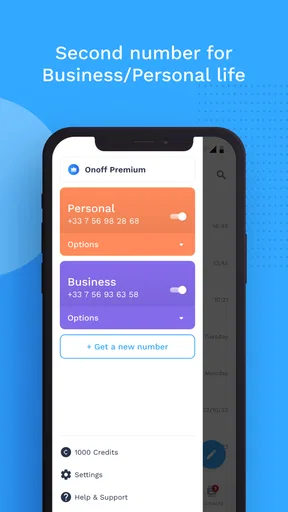
Before setting anything up, I’d decide what the extra number is meant to protect or organize. A freelancer might use it for new clients, while someone selling a chair online could share it with a potential buyer instead of handing over a personal number. The same approach can help separate a side project from family calls. The benefit is not simply having more numbers; it is making the boundary clear enough that you know which conversations belong where.
That boundary works best when you choose one purpose and stick to it. If the number is for clients, use it on proposals and business profiles, not on every shopping form too. If it is for short-term public contact, avoid mixing in conversations you’ll need to find months later. A little discipline at the start makes the second line easier to manage when the inbox fills up.
From setup to a useful routine
The app is free to install, and Onoff Telecom develops it as a communication app. It has been available since January 25, 2016, and version 5.8.3.0 is listed for devices running Android 9 or later. The age rating is Everyone. Those details make it approachable for a broad range of users, though they don’t answer the personal question of whether a virtual number fits your contacts and daily habits.
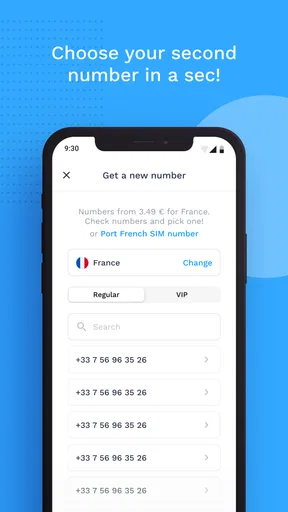
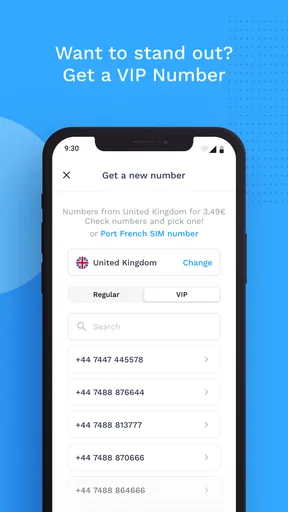
After creating an account, the published experience describes choosing a number, including options from different countries, and using the app for calls and texts. I would treat that selection as a decision about reachability, not decoration: pick the number that makes sense for the people who need to contact you. If you are setting up a work line, test it with a trusted contact before putting it on a public profile, so you can see how incoming communication appears and get comfortable switching between lines.
For instance, imagine I’m arranging a weekend furniture sale. I can put the second number in the listing, answer questions there, and keep those calls apart from personal conversations. Once the item is gone, I can stop sharing that number in new listings. That workflow is more useful than simply collecting another line, because the number has a defined job and a clear endpoint in my routine.
Keep conversations organized after the first call
Separate numbers can make it easier to recognize why someone is contacting you, but they do not automatically create a tidy filing system. I’d use a consistent contact name and save enough context to remember whether a person is a customer, a buyer, or someone from a personal circle. Before replying, check which number is active in the conversation; a quick pause can prevent a work response from going out under the line you intended to keep personal.
Worth Reading Before You Choose

Flipboard Shows What News Apps Must Do Beyond the Feed

Switching to Android Auto Means Rethinking Your Driving Routine

Google Calendar Makes a Crowded Week Easier to Manage

Ludo King Makes the Most of the Minutes Between Plans

Baby Panda World Brings Quick Play to Modern Phones, but Its Game Library Feels Busy

ESPN’s Live Game View Makes Following Close Games Easier
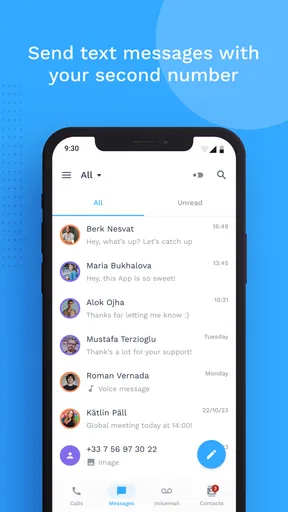
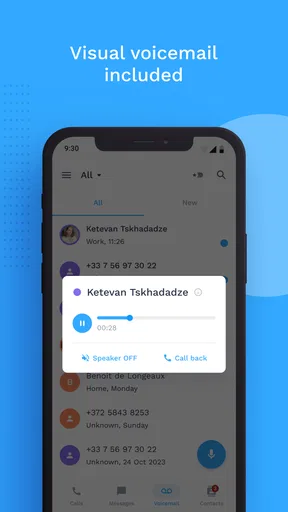
Voicemail and message storage, along with custom greetings for different numbers, can help make each line feel purposeful. A greeting that identifies a work line, for example, gives callers useful context before you pick up. If you’re using a number for enquiries, check its messages as part of a regular routine rather than assuming every notification will arrive at a convenient moment. A second inbox only helps if you remember to look at it.
There is also a useful handoff when a number moves from private testing to public use. First, share it with one person you trust and confirm that calls and texts reach you in the app. Then add it to the relevant profile or listing. This small check is especially worthwhile before relying on the number for a time-sensitive appointment or a client conversation. It can reveal confusion in your own routine before someone else is waiting for a reply.
Where it differs from a regular line
Compared with carrying a second phone or arranging another conventional line, an app-based number keeps the extra line on the device you already use. That is convenient if your goal is separation without extra hardware. A second handset may still suit someone who wants a physical divide between work and home, or who needs a separate device to leave at the office. A standard carrier line may be a better fit when your priority is keeping calls and texts within the familiar phone interface and service arrangement you already rely on.
The trade-off is that the extra line has its own app-based workflow. You need to notice which number you are using, keep the app in your routine, and be comfortable handling calls and messages there. Onoff also offers in-app purchases, with listed items ranging from $0.99 to $399.99, so I would check the available purchase details against my intended use before assuming the free download covers everything I need. The range is broad enough that it’s sensible to understand the specific option before committing.
Number portability may matter if you already use a number you want to keep: the app’s feature set includes the option to port an existing number. I would treat that as a decision to investigate carefully before changing how people reach me, rather than something to do casually. Think through which contacts, accounts, and printed materials use the number, and plan the transition so people are not left unsure which line to call.
Who benefits, and where the fit weakens
I can see the strongest case for Onoff Numbers when one person needs a clear boundary but does not want another device: freelancers, people taking occasional public enquiries, and anyone separating a small project from personal calls. It is also a reasonable option if you want to try a second-number workflow before deciding whether a more permanent arrangement is worth it. The app has more than a million installs, a 3.6 average from around 18,000 ratings, and 276 written reviews, which gives a prospective user a broad sense of its reach without guaranteeing that every setup will feel the same.
I would skip it if I rarely need another number, dislike checking more than one communication inbox, or need the extra line to behave exactly like my primary carrier number in every situation. It is also not automatically the best privacy choice just because a number is separate: sharing it widely still exposes that line to unwanted contact, and a second number cannot make a public listing private. For occasional one-off exchanges, a platform’s built-in messaging may be simpler because it keeps the conversation attached to the listing or service where it began.
Reliability is another practical consideration. Calls and messages depend on the app-based experience, so I would not make an unfamiliar setup my only contact route for something urgent. Try it first with low-stakes conversations, learn where voicemail and messages appear, and keep a backup contact method for important plans. That is not a reason to avoid a second line; it is a sensible way to learn how well the workflow fits your network before relying on it.
What is Onoff Numbers?
Alright, so first things first. Onoff Numbers is an app that provides you with virtual numbers, letting you have several lines on your single device. Whether it's for business, personal use, or just for those times when you don’t want to give out your main number, this app has got you covered. It’s like having a Swiss Army knife of phone numbers right in your pocket.
Getting Started with Onoff
Setting up Onoff Numbers is as easy as pie. Once you download it from the App Store or Google Play, you just need to create an account. The interface is super straightforward, so you won’t get lost in a sea of settings. You can choose from a variety of numbers from different countries, which is pretty neat if you’re into international communication.
The app is intuitive, and I appreciated the quick setup. Within minutes, I was able to start sending and receiving calls and texts. Seriously, it couldn’t be simpler.
Features That Stand Out
Now, let’s talk features. One of the coolest things about Onoff Numbers is the ability to separate your life into different compartments. You can have a number for work, another for personal stuff, and even one for those online transactions where you’re not too sure about giving out your primary number.
Another handy feature is the voicemail and message storage. You won’t have to worry about missing important messages, and you can even set custom greetings for each number. This is especially useful if you’re using a number for business purposes. Oh, and did I mention that you can port your existing number? Yup, you don’t have to give up your beloved digits if you don’t want to.
The App Experience
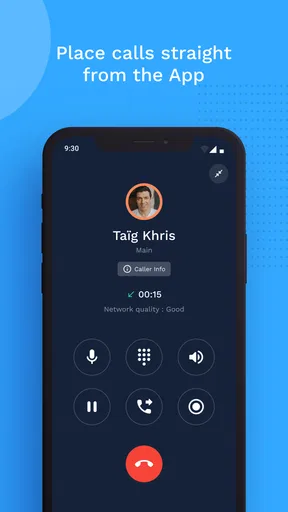
Using Onoff Numbers feels like a breeze. The app’s design is clean, and everything is where you’d expect it to be. It doesn’t try to overwhelm you with too many options, which is a refreshing change. The call quality is solid too. I tried it out over both WiFi and cellular, and it performed well in both cases.
Texting from the app is smooth, and you get notifications just as you would with your regular messaging app. What’s more, you can even send pictures and other media. It’s like your regular phone service, but way more flexible.
Security and Privacy
Naturally, when dealing with phone numbers, security is a big deal. Onoff Numbers uses end-to-end encryption for messages, which means your conversations are safe from prying eyes. The app also doesn’t store any call logs on your device, which adds an extra layer of privacy.
For anyone concerned about privacy, this is a huge plus. It’s reassuring to know that your business calls and personal conversations are kept secure.
Final Thoughts
So, what’s the verdict? Honestly, Onoff Numbers is a fantastic app for anyone who needs multiple phone numbers without the hassle of carrying around extra devices. It’s user-friendly, secure, and offers a ton of flexibility.
Whether you’re a freelancer managing different clients, someone who travels often, or just someone who likes to keep things organized, this app could be a game-changer. Plus, with the option to pick numbers from different countries, the possibilities are pretty much endless.
Give it a shot and see how it can fit into your lifestyle. You might just find that managing your phone numbers has never been easier!
Pros
- Easy number management interface.
- Multiple numbers on one device.
- Affordable virtual number pricing.
- Seamless call and text functionality.
- Strong privacy controls and features.
Cons
- Limited international number availability.
- Occasional call quality issues.
- App requires stable internet connection.
- Number porting can be slow.
- Some features are subscription-based.
FAQs for Onoff Numbers
What is Onoff Numbers and how does it work?
Onoff Numbers is an app that allows users to have multiple phone numbers on a single device without needing extra SIM cards. It works by providing virtual numbers that can be used for calling, texting, and voicemail. This is especially useful for separating work and personal communications.
Is Onoff Numbers available for both Android and iOS devices?
Yes, Onoff Numbers is available for both Android and iOS platforms. Users can download it from the Google Play Store for Android devices or the App Store for iOS devices. The app provides a seamless experience across both operating systems, offering similar features and functionalities.
What are the subscription costs associated with Onoff Numbers?
Onoff Numbers operates on a subscription model, with pricing varying depending on the country and the chosen plan. Users can select from various plans that fit their needs, such as monthly or annual subscriptions. It's important to check the app for the latest pricing details specific to your region.
How secure is my data with Onoff Numbers?
Onoff Numbers prioritizes user privacy and data security. The app uses encryption to protect communications, ensuring that calls and messages remain private. Additionally, the app does not sell personal data to third parties, adhering to strict privacy policies to safeguard user information.
Can I use Onoff Numbers for international calls and texts?
Yes, Onoff Numbers supports international calling and texting. Users can choose numbers from various countries, making it easier to stay connected while traveling or conducting international business. Rates for international communication may vary, so it's best to consult the app for detailed pricing information.


